

So you're a pretty great web developer already.
You've got some killer CSS chops (cross browser even), perhaps you've been a Photoshop expert for years, and you've got enough jQuery knowledge to make almost any chained animation go smoothly.
But certainly you ask yourself, what's next?
In fact, one of the most asked questions about web development is, "how do I stay on the leading edge?" Chris Coyier recently presented a fantastic talk on the subject, and there are sites fully dedicated to staying up to date on the latest web design news. Addy Osmani's roundup on becoming a better front-end engineer sets some great content out on the board for you to consider on the subject; needless to say, a lot of smart people are thinking about this very subject, so you're headed in the right direction.
In this article, we will talk about a very important way to set yourself apart and become a better developer: becoming an effective rapid interaction developer.
What is "Rapid Interaction Development?"
Rapid interaction development is a term we're using today to describe the practice of rapidly creating something for the web that a user can interact with, specifically with an intention to quickly iterate and polish the interaction. This is not the same thing as designing flat documents; instead, this includes building something that has one or more storylines of interaction.
This may include, for instance, a widget that the user can type into and search, or a dropdown menu that allows a user to select a sub-menu item. These interactive pieces are the building blocks of a larger storyline of the user's full experience of using a website, and thus they are incredibly important to be able to iterate through and "feel". When designing a website, these interactions can make or break the user's experience, and thus could make or break the effectiveness of the site as a whole.
Interactions don't always have "moving" pieces; in fact, rapid interaction development often relies on content hierarchies and hyperlinks as much as anything else. Interaction development takes into account the full interaction of the human with the computer, incorporating intuitions about the userbase, basic understanding of human factors, and a knowledge of the message and image of the organization or individual represented by the interaction.
Understanding the Value of Rapid Interaction Development
If I am hiring a front-end web developer (or anyone for that matter), I will be thinking about five primary things.
- Does their personality fit my team?
- Are they talented?
- Are they efficient?
- Are they consistent?
- Can I pay them properly?
These questions are extremely important to any part of the hiring process. The first question is usually decided based off of interaction chemistry - not something we are going to cover in this article. The fifth is usually decided on a case-by-case basis, and is also something that is outside the scope of this article. However, when answering the other three questions, two primary factors play into the judgement:speed and accuracy. In the case of the web developer, rapid interaction development is a way of proving that you have take the craft of interaction development very seriously.
Rapid interaction development isn't accidentally fallen upon when a muse strikes (as may be the case with a more art-driven degree). Instead, rapid interaction development is a skill that is honed by the developer. This skill proves efficiency and talent, and gives more confidence in the developers ability to achieve consistency. To be able to rapidly develop interactions, the developer must have the two magic ingredients: speed and accuracy.
A disclaimer: It may be that someone gets hired because, though they aren't as talented as another individual, they are extremely consistent and have a great personality. This by no means is a "how to get a job as a developer" guide.
Let's Get On With It, Shall We?
With the understanding of the importance of rapid interaction development, we now can understand how you can immediately begin to hone this skill. Some of these tips take a simple change in mindset, while others take an investment of learning or pattern change. All of these, however, can help you become a better, faster, more valuable web developer.
Optimize Your Patterns
Have you adopted a CSS framework? If so, then you understand the value of reusable code. You have most likely adopted patterns without realizing it. In order to prove this, ask yourself, "when I start to build a website, what is my first step?" If your answer is "I don't know", then it's time to figure it out. If your answer is "first I open my text editor", then you've adopted at least one step in a pattern.
So, how do you optimize a pattern? These are often called workflows, but that's not an adequate description, as workflow doesn't include everything we want to talk about here. Some common tools to help you structure your pattern are CSS and JS "frameworks" like Twitter Bootstrap, Foundation, or Topcoat..


..perhaps full optimization and processor tools like CodeKit..

..startup Wordpress themes like Bones, and even the option of building customized scripts powered by a command line. If you're a more advanced JavaScript developer and are looking to move into a new space, you should consider looking at Backbone,Ember, and other (MVC-oriented JavaScript frameworks)[http://todomvc.com/]; it would also be advised to look into Node, which empowers server-side JavaScript. It may take you some time, but picking up and learning some of these tools certainly increases productivity in the long run.
Recommendation: decide on some kind of HTML boilerplate/reusable "index.html" document and associated file structure that follows commonly accepted conventions, is built with semantic markup, and gives a "blank slate" to work from (think: HTML5 Boilerplate). Perhaps if you work primarily with Wordpress or another tool, you'd want to find a similar boilerplate with base-level functionality for that tool.
If you're a bit more advanced, pick up some Yeoman skills for fast project scaffolding and wizard-based boilerplate generation. Decide on a CSS and/or JS framework (Bootstrap, Foundation, Topcoat), and start using a preprocessor for CSS sooner rather than later. Learning a preprocessor is well worth the time investment, and won't reduce productivity as LESS and SASS can both handle vanilla CSS. Try building a full wireframe of a basic layout completely with a framework's built-in classes. You'll likely be surprised how little code you need to write to make a functional layout happen very quickly. This reduces the overhead of writing repetitive code and also has the added benefit of pulling from much more extensive testing and cross-browser considerations than one person can do on their own.
Work With What you Know; Intentionally Learn What you Don't.
It's absolutely important to adopt a lifestyle of learning as a developer. Adopting new tools and skills like those discussed above is a part of the lifeblood of any successful developer. The technology we are using every day is changing faster than anything else; in order to stay at or above our current place in the industry, it is imperative that we learn continuously.
But - it is also as important to understand that learning new technology will slow you down - at first. For this reason, when you are practicing rapid interaction iteration, you shouldn't also be learning a new framework. Instead, intentionally take some time out of your week and dedicate it to learning that framework through a pet project, weekend hack night, or by implementing pieces of the new tool in a project that absolutely needs the new functionalities provided by that solution. This will allow you to maintain your momentum, and solve problems fluently rather than in a stop-go Google and StackOverflow binge. Most importantly, this intentional segregation allows you to focus on what matters: solving design problems instead of code bugs.
As a secondary note, when you are intentionally learning, it also helps to solve problems that already have well-known and well-documented solutions; of course, the world doesn't need another simple to-do application. But creating a to-do application may help you understand JavaScript much more, and may help you in the future when you are synthesizing information in order to solve new problems. Building solutions for problems that already have well documented solutions helps you compare and contrast your solution, and makes it easier to search for help when you get stuck. If you are in uncharted territory and trying to learn at the same time, getting lost is much more likely, and will detract from the goal of the learning process.
Adopt Hyperfocused Mini-Sprints
If you've heard the term "agile", you might have some idea of what a sprint is. Sprints are short, pre-defined work periods where developers decide on a set of goals, and "sprint" to finish those goals within the alotted amount of time. Because we are talking about rapid interaction development, a sprint is well suited to this discussion. Here are the basics.
- Define
Prioritize tasks/goals, define the length of the sprint, remove or add tasks until the estimated amount of time to complete the tasks matches the predefined length of the sprint - Sprint
This is time where you are "in the zone" - zero distractions, etc. - Reflect
Once the sprint is complete, check your progress. Did you meet or exceed your goals? What caused the most hangup? - Adapt
Learn from what you reflected on, and put systems into place to help avoid the hangups.
In the traditional agile approach, sprints are based on helping with team collaboration and generally last multiple days or even weeks. Here, we are talking about self-management and hyperfocused mini-sprints. These mini-sprints might even simply focus on a single task or interaction, and its associated goals. The process of defining and prioritizing the task or its subtasks before diving into the work, and subsequently taking time to reflect on the process and adapt your workflow or patterns (remember, it's important to optimize your patterns) will help you become more objectively aware of your speed and productivity, and will allow you to be more conscious of what could use improvement at a micro-level.
Recommendation: define two 3 hour sprints for one day, each with a primary task. The purpose of the sprint (as with a physical sprint) is to drive your brain as hard as you can for those 3 hours. After those 3 hours, you will need a brain break; perhaps this is your lunch break, or maybe you've chosen to adopt an alternative schedule to allow for an uninterrupted hyper-focused block of time (more on that later). Whatever the case, planning these sprints apart from each other will help you recharge your brain. It's worth trying completely opposite types of activity (like taking a walk or reading fiction) or even a nap - more on that here. If you work for an agency, perhaps the break in between is the time you set aside for meetings, administrative tasks, or less taxing development tasks. Some people consider this the best way to work every day, and some may choose to do this kind of "sprint interval training" sporadically; choose what ends up making you the most productive, and increases your interaction development speed.
Temporarily Block Go-To Websites
If you are like most people, your fingers have muscle memory; when you open a browser, is it instinct to immediately type in Hacker News, Tuts+, or Twitter? What are the sites that cause you to procrastinate?

Hacker News has attacked this problem in a specific way, offering signed-up users the ability to set up a "noprocrastinate" restriction. There are some interesting tools that also offer these kinds of restrictions, but why not do it yourself? On a Mac, run the following commands from terminal:
1
2
3
4
5
6
7
8
9
| sudo nano /etc/hosts# enter your password when it asks for it.# This will open a file in a terminal-based code editor;# Don't worry! You won't be doing much in here. Type the following lines.0.0.0.0 twitter.com 0.0.0.0 facebook.com # press Ctrl+C (exit), Y (yes I'd like to save), and enter (save as the existing filename) |

You can edit the same file on Windows (see this explanation).
This will block you from using Twitter or Facebook, and will instead redirect you to your localhost (0.0.0.0 is a shortcut to your machine). To get back to social-network-land, just follow the same steps, but remove the lines you added.
Recommendation: Should you block Facebook and Twitter all the time while you are working? We say no. It makes sense to be able to take small breaks between tasks to keep from burning out. However, during a sprint, if these sites are seemingly causing you to waste time, it's important (at least until you break the muscle-memory driven habit) to put them on pause. The important note here is, control your procrastination, even if that means scheduling time to waste. Being aware of the time you are putting into a given activity will help you be more conscious of whether or not that time is slipping away from your control.
Minimize Interruption
Interruptions have long been known to decrease productivity of knowledge workers. (See here, here, here, here - and there is much more available through a quick Google search.) Programmers (and, therefore, web designers) are susceptible to potentially only getting one uninterrupted 2-hour session in a day. In agile methodology, there is the concept of core hours that holds that strong focus should be maintained for 5 total hours per day. This is a far jump from the two hours programmers can expect to achieve in a normal office.
The Anatomy of an Interruption
There are many kinds of interruptions, but we will look at two specific aspects of interruption today. The first are welcomed or "self-inflicted" interruptions, the second are external or "intrusive" interruptions. Both types are detrimental to productivity, and both types can be somewhat managed in different ways.
Self inflicted interruptions occur because you have in some way created space for them to occur. These usually come in the form of programmable notifications (phone, computer, etc).

Intrusive interruptions occur because other humans need you to pay attention to them. The disconnect is the timing and sense of urgency. You must manage your own time, and you must put into place ways of doing so that circumvent the negative effects of interruption as much as possible.
So what do you do to alleviate interruptions? How do you achieve Zen Zone Time? Here are a few of our recommendations.
- Minimize or completely disable notifications
This includes phone notifications like texts, email, Twitter, and even "chat". Hide your chat windows, and attend to them as a part of your workflow, instead of on a response "demand" basis. This may seem like it will hurt your productivity at first, but you might be surprised how willing people are to wait if it is actually important, and how likely they are to problem solve for themselves if you are too busy to break from what you are doing. - Have your management read this: adopt an organizational respect for The Zone.
Create rules in the organization about "zone time" or "maker time". This means there are specific boundaries for when, where, and how you can interrupt someone when they are in the zone. Have specific ways of signifying you are "under", like putting your headphones in or working in a specific part of your office. This is the purpose of "away" messages on chat, as well. Management must set aside time for the cultivation of rapid interaction development!
Managers - this may seem like a potential threat to the office, but like anything, you can try this for a bit to see what pieces fail and what pieces succeed. You will likely see productivity increases immediately. - Isolate yourself
Perhaps the most effective solution, isolating yourself makes you the controller of your space. This can happen in many different formats; for instance, many web designers and developers work from coffee shops to dive into isolation. This will prevent interruptions that happen as a result of physical proximity. Isolation doesn't always mean location, however; if most of the office works from 9-5, perhaps you work from 6AM to 2PM or 12PM to 8PM. This will give you space and time to think and work without interruption. Perhaps you can work remotely one or two days per week? Maybe it's much simpler than that for you, particularly if you are a freelancer. - Be diligent with scheduled communication
If you are going to put barriers up around you, you must also be willing to stick to your word and respond to messages when you come out from under the Zone. Don't let this slip, or else the productive aspects of your Zone time will be reduced by the negative aspects of your communication habits. Oh, and don't forget to call your mother!
Game On: Competition and Reward
What makes "hackathon" events so productive? How do people turn out viable products in 48 hours? Perhaps it is a mixture of characteristics.
1. Anticipated, protected, planned time for focused rapid development
2. Competition with others
3. Cash rewards
Hackathons break from the "normal flow" of every day work. Certainly, we wouldn't want to work 48 hours in a row all the time. But the productivity mindsets that arise from this are extremely important. We've alluded already to how important focus and uninterrupted time is. However, it's a worthy effort to consider how creating some personal competition and reward systems may help increase your efficiency in development. This helps set benchmarks and naturally trains your brain to adapt to the behaviors that are rewarding.
1. Anticipated, protected, planned time for focused rapid development
2. Competition with others
3. Cash rewards
Hackathons break from the "normal flow" of every day work. Certainly, we wouldn't want to work 48 hours in a row all the time. But the productivity mindsets that arise from this are extremely important. We've alluded already to how important focus and uninterrupted time is. However, it's a worthy effort to consider how creating some personal competition and reward systems may help increase your efficiency in development. This helps set benchmarks and naturally trains your brain to adapt to the behaviors that are rewarding.
Recommendation: if you work with another developer, decide on a competition with clear goals, and make it time oriented. Doesn't really matter what those goals are. Take some time to work through them. Perhaps you can compete against yourself; practice by using the sprints as your competition, and set your goals to increase your efficiency by some amount of time. Set rewards up both for when you are in a competitive mode, as well as for when you complete any focused sprint of work. This will help keep you focused during the sprint itself. A reward may be a physical thing (like a cup of coffee) or something less concrete (like a VIP parking spot for a week or "free time").Dive into the Open Source Community
We will keep this tip short, because the benefits here will be obvious. The Open Source World is full of amazing and talented people building things that help others do their jobs better every day. Examples like the frameworks we mentioned above just barely scratch the surface. Here are some of the benefits to working and communicating with the open source community.
- Exposure to new tools
- Free solutions to common problems
- New solutions to emergent problems
- A better understanding of problems you may not know exist
- Opportunity to contribute and become a part of the giving/receiving cycle
- Thought Osmosis: learning by repetition and exposure
Diving into the open source community and learning to use tools that are offered can immediately increase productivity, but also makes it much more likely that another person could pick up your project and continue developing on that project. Open source allows for people to collaborate around a decided standard and pre-existing documentation. This reduces cognitive overhead for transfer of projects, and makes you a much more literate developer; this immediately translates into higher efficiency.
Recommendation: Get a GitHub account, and start building things with tools available on GitHub.

This is somewhat of a reiteration of what we said earlier - use open source frameworks to solve problems in predictable, patterned ways, and participate in the community of other people who are doing so. Collaboration and discussion are very important keys to learning.
Conclusion
This by no means is a complete list of things you can do to become a rapid interaction developer. Leave some notes in the comments of things you've tried that have worked, failed, or have had little to no effect!
 |
| What You'll Be Creating |
When was the last time you took a critical look at the appearance of your resume? If you've been updating the same old resume format year after year, your resume could be creating the wrong impression with potential employers.
Even worse, a badly presented resume is more likely to be thrown away. That destroys your chances of even being considered for a position. You can do better. It's time to redo your resume using a modern resume template.
In this tutorial, you'll learn the characteristics of a modern resume. I'll also take you step-by-step through the process of personalizing a modern resume template in MS Word 365.
What Is a Modern Resume?
Do you know the characteristics of a good resume? Most job seekers do not. That’s why they continue to use outdated and old fashioned formats. A modern-looking resume can help you stand out. Here is a short list of the characteristics of a good, modern resume:
- uses professional fonts
- has a well-organized and clean design
- contains current contact information
- customized for the job you're applying for
- includes keywords for skills
- has social media contact information
How to Use a Modern Resume Template with MS Word
In this section you'll learn how to personalize a your resume template in three easy steps. The basic steps to to follow are:
- Gather your information.
- Download your template.
- Personalize your resume.
We’ll look at each step separately.
Let's start with the information you'll need to personalize your template.
Step 1. Gather Your Information
To make a resume template your own, you need your most current information. Besides your full name, you'll need your most recent:
- job titles
- years employed
- educational accomplishments
- awards received
- skills
- social media contact information
If you're applying for a specific job, make a list of the key words from the job posting. If possible, include them in your resume and on the cover letter.
To make sure you don't miss any information look at:
- your previous resume
- your Linked-In profile
- your professional portfolio
- your testimonials
Now that you’ve gathered your information, you’re ready to create an updated resume. First, you’ll need the right template.
Step 2. Download the Best Modern Resume Template for Your Needs
Choosing the right resume template can be difficult. You want one that is flexible and easy to update. You want to be able to adjust it quickly for various jobs. We have a great selection of resume templates on EnvatoMarket.
To find the complete selection click the Browse Categories button on theGraphicRiver home page. Select the Print Templates option. Resumes are under the Stationery option: Print Templates > Stationery > Resumes.
After you select Resume from the menu, you get a thumbnail representation of some of the various resume templates available. Here is a look at some of the popular resume templates available in our Best sellers option:
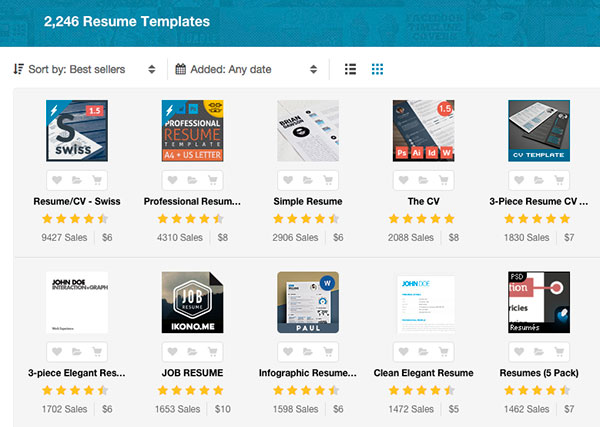
You can sort the resume templates by:
- newest items
- trending items
- best sellers
- best rated
- price: low to high
- price: high to low
You can also specify the date a resume was added or enter a price range.
The Modern Resume Template We'll Customize Today
For the purposes of this tutorial, we've chosen the Resume/CV - Ashley template to customize in Microsoft Word 365.

We chose the Ashley template because it's high quality and has positive feedback from customers. It also features a clean look with room to include your current skills and your social media links. It's reasonably priced and works with the most popular, current versions of MS Word. It can be used on a Mac or a PC.
To purchase the template, click Add to Cart and go through the quick checkout process. Once you have purchased the template these words appear above the template,
You have bought this item. You can download it here.
Click the hyperlink and the words download it here to download the template. The download includes two folders:
- _MACOSX
- bilmaw - Resume - Ashley Files
Under the bilmaw - Resume - Ashley Files there are two subfolders:
- Resume - Ashley Files'
- Social Icons
You'll also see the files .DS_Store and a PDF help file titled HELP resume - ashley.
The Help file contains useful details on what is included with the template and explains how you could further customize it.
Install the Free Font
After you've downloaded the template, download the free Raleway font used by the template. The complete instructions for installing fonts are found on page three of the PDF help file. The instructions may vary depending on the type of machine and operating system you use.
Here is how you install the font on a PC:
- Download the Raleway font from Fontsquirrel.
- Click the button labelled DOWNLOAD TTF (The button is located at the right next to the name of the font).
- Save the file in any folder.
- Go to the folder where the file is saved and click on the zip file.
- You’ll see variations of the font listed (bold, italic, etc.).
- Click on the variation name.
- In the dialog box that opens, click Install.

Caution: Be sure to open all variations of the font. Each variation, such as bold, italic, etc. must be installed separately.
If you’re working on a machine other than a PC, follow the instructions on page four of the PDF to install the font.
Once you've downloaded the fonts, you’re ready to personalize your resume.
Step 3. Personalize Your Resume
Now let's set up and then customize each section of your resume.
1. Basic Setup
You are now ready to open the template and customize it. Since I am working on a PC, the template is found within the bilmaw - Resume - Ashley Files folder in the subfolder Resume - Ashley Files.
Choose between a template for A4 size paper or US Letter size paper. For the purposes of this tutorial, we are using US Letter (8 1/2 by 11) size. When you click on the paper size you will see the various types of templates available:
- InDesign CS4-5
- InDesign CS6
- Microsoft Word
- PSD US Letter
For this tutorial, choose the Microsoft Word folder and open the file called resume - ashley US Letter.
To review, the path is: bilmaw - Resume - Ashley Files > Resume - Ashley Files > US Letter > Microsoft Word > resume - ashley US Letter.
Now the MS Word resume template opens. At this point it only shows placeholder information and should look like this:

We're going to update the template with information from a fictitious job seeker, Jane Ann Doe. You should fill in your name instead.
First, check to see whether the Raleway fonts installed correctly:
- Select any text on the document and right-click on it. A font box should display showing some variation of the Raleway font.
- If any font besides Raleway appears in the box, go back and review the instructions for downloading the fonts.

I always suggest renaming and saving the file. That way, if something goes wrong while you are updating the resume template you can go back to the unaltered template file and start again.
After you’ve renamed the file, you are ready to start entering your own information into your resume.
2. Customize the Information
You'll notice that the resume is organized using anchored text boxes. Here is how you replace the text information anywhere in the resume:
- Click in the text box.
- Select and highlight the text you want to change.
- Type your information over the highlighted text.
Tip: To make the text larger, use the MS Word zoom icon.

Now that you know how to update the placeholder text in the resume template, you can replace it with your information. Be careful though, not to accidentally move the text box when you update it.
Several sections of the resume template require additional instructions. Let's start with the Resume Summary.
3. Craft Your Resume Summary
Your resume summary is one of the most important parts of your resume. It's often the first thing a potential employer reads. To create a stronger resume summary:
- Use adjectives to describe your work.
- Emphasize accomplishments you are proud of.
- Match the summary to the job ad.
- Keep it short. Four to five lines is ideal.
- Don't use the words "I" or "my."
In this template, the resume summary appears under the heading Professional Statement. To adjust the size of the text box, click on the handle and drag the edge of the box.

Tip: You can also move the graphic lines in the template using the handles on the line.
4. Change Your Social Media Contacts
One of the characteristics of a modern resume template is the inclusion of social media contact information. The Ashley template comes with a special social media contact section. There are also 36 social media icons included as PNG files, which you can use.
The social media contact information appears in the right center of the template under the heading Social.
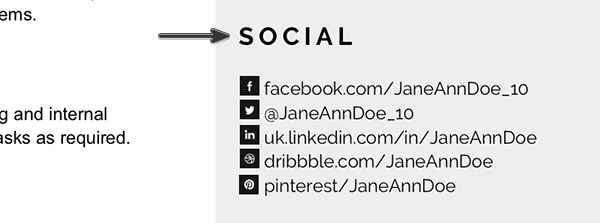
To change your social media contact information:
- Click on the information in the text box. The information is then highlighted.
- Type over the information in the text box.
- Right-click on the icon that you want to replace.
- Then, select Change Picture from the pop-up menu.
The dialog box below displays:

- Select the From a file option.
- Click on browse. The fonts are located at bilmaw - Resume - Ashley Files > Social Icons.PNG
- When you find the icon you want to use click on it and click on Insert.
The social media icon you selected replaces the previous icon.
5. Change Your Skills
The Skills section of this modern resume is an excellent place to highlight any skills you've learned on the job or in school. You can also include keywords that are skills.
On this template, your skills appear as a bar chart. The more accomplished you are in a skill, the further to the right the bar goes.
Skills are listed under the Skills heading on the bottom right of the resume.

Here’s how to personalize your skills information:
- To change a skill, click in the text box and type the new skill information over the placeholder text.
- To change your proficiency in a skill, click on the dark line and drag the handles to the right to indicate that you are more proficient or to the left if you are less proficient.

Once you've replaced the resume placeholder text with your information, you are ready to begin your job search. Don't forget to also personalize the cover letter included with the template.

Modern Resume Template Examples
Here is a quick showcase of more modern resume templates and an example resume that was created with each template. Each template includes a matching cover letter.
1. Resume/CV - Blair
Blair is a classic-looking resume updated to include social contact information. It also includes a matching cover letter. It has an attractive, minimal style logo in the upper left corner, making it ideal for freelancers and small business owners. All artwork and text is fully customizable. Multiple format options available, such as INDD, IDML, PDF, PSD, and Microsoft Word DOCX.

2. Job Resume Template
This template includes four corporate resumes and a matching cover letter. The large banner will help you stand out with potential employers and gives this modern resume a professional look. Available in InDesign and MS Word formats, as well as Illustrator EPS for graphic components.

3. My Clean Resume/CV Set with MS Word
This template is a minimalist resume with style. The typography has been intentionally designed to make your resume more attractive and professional. Potential employers can see everything they need to know at a glance. Available in Adobe Photoshop and MS Word formats. These set includes a resume template, cover letter template, and reference page template.

4. Two-Piece Swiss Style Resume Set
This simple design makes good use of color and intentional space for an attractive presentation. You can easily change the color to suit your own taste with one click. PSD and Word formats included, as well as Illustrator EPS for graphic components. Includes a resume and cover letter in this template set

Inscription à :
Articles
(
Atom
)


